

Connect Mercado Pago
Connect your Mercado Pago account in one click to receive direct payments from your sales.
Why do we use Mercado Pago in Argentina?
Mercado Pago is the best payment processor in Argentina. It's the fastest, saves all your buyers' cards, and offers something no other processor has: payment with account balance.
Approximately 30-40% of transactions on Fanz are made with Mercado Pago account balance. This makes the purchase so quick and frictionless that sales increase considerably compared to other processors. The buyer simply taps "Pay" in the app and that's it.
Why do I need to connect Mercado Pago?
Connecting your Mercado Pago account is required to create events and sell tickets on Fanz. The process is extremely simple: just one click and you're done.
Fanz uses Mercado Pago (or Stripe for international sales) as the payment processor. This means:
- Money goes directly to your account – It doesn't pass through Fanz, it goes straight to your Mercado Pago.
- You get paid in real time – Each sale is credited immediately according to Mercado Pago's policies.
- Multiple payment methods – Credit card, debit card, cash, Mercado Pago balance, etc.
- Maximum security – Mercado Pago handles all sensitive card data.
Free events too. Fanz only lets a brand create and publish events once it has a payment processor connected, regardless of whether tickets are paid or free. If your event is free you still need to connect Mercado Pago (or the processor for your country): nothing is charged for those tickets, but the connection is a requirement to publish. Until you connect one, the dashboard tells you that you need to connect a payment processor before creating an event.
The account has to be yours. The Mercado Pago account you connect must match the details registered for your brand (account holder, legal entity or responsible person). Connecting a third party's account causes inconsistencies in billing and in Mercado Pago's checks, and can end in rejected payments.
Before you begin
Make sure you have:
- An active Mercado Pago account – If you don't have one, create it for free at mercadopago.com.ar
- Access to your Mercado Pago account email
- Mercado Pago credentials ready to authorize the connection
Step 1: Access settings
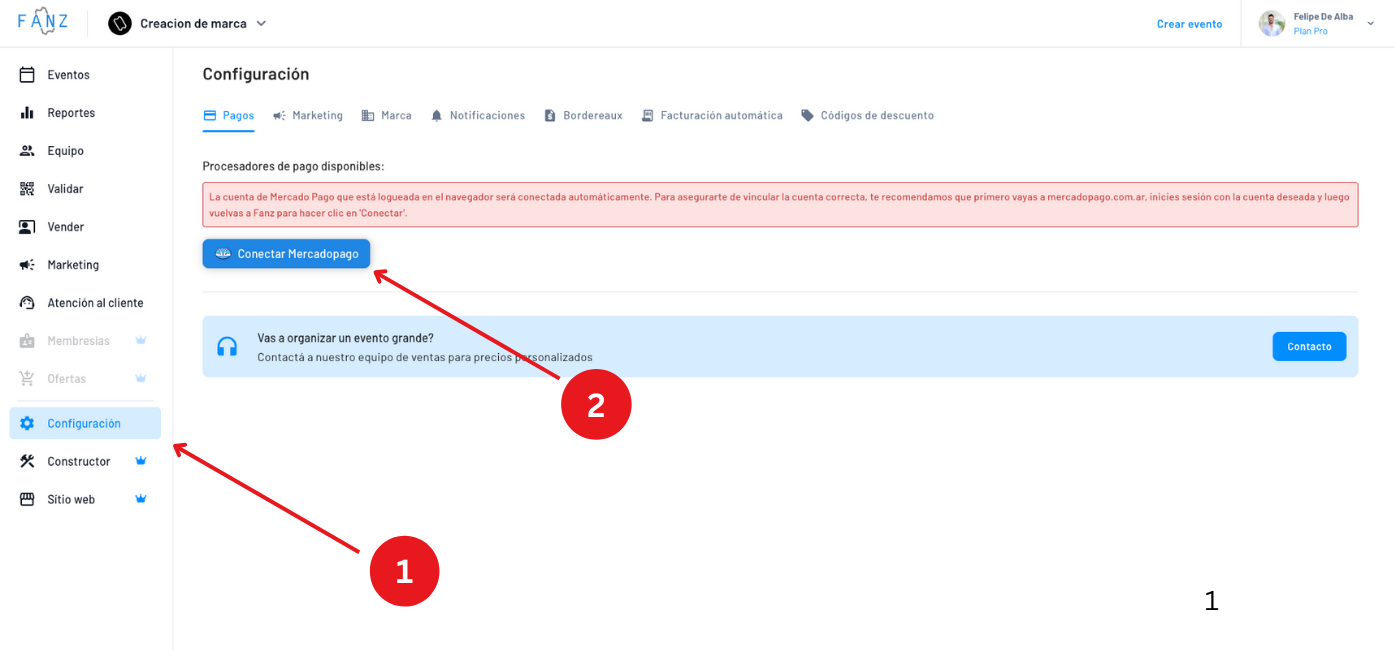
Log in to the Fanz dashboard and go to Settings → Payments.
Step 2: Connect your account
On the Mercado Pago screen, you'll see a large button that says "Connect Mercado Pago account".
Click that button and you'll be redirected to Mercado Pago to authorize the connection.
Important: Make sure to log in with the Mercado Pago account where you want to receive the money. If you have multiple accounts, use the correct one.
Step 3: Authorize in Mercado Pago
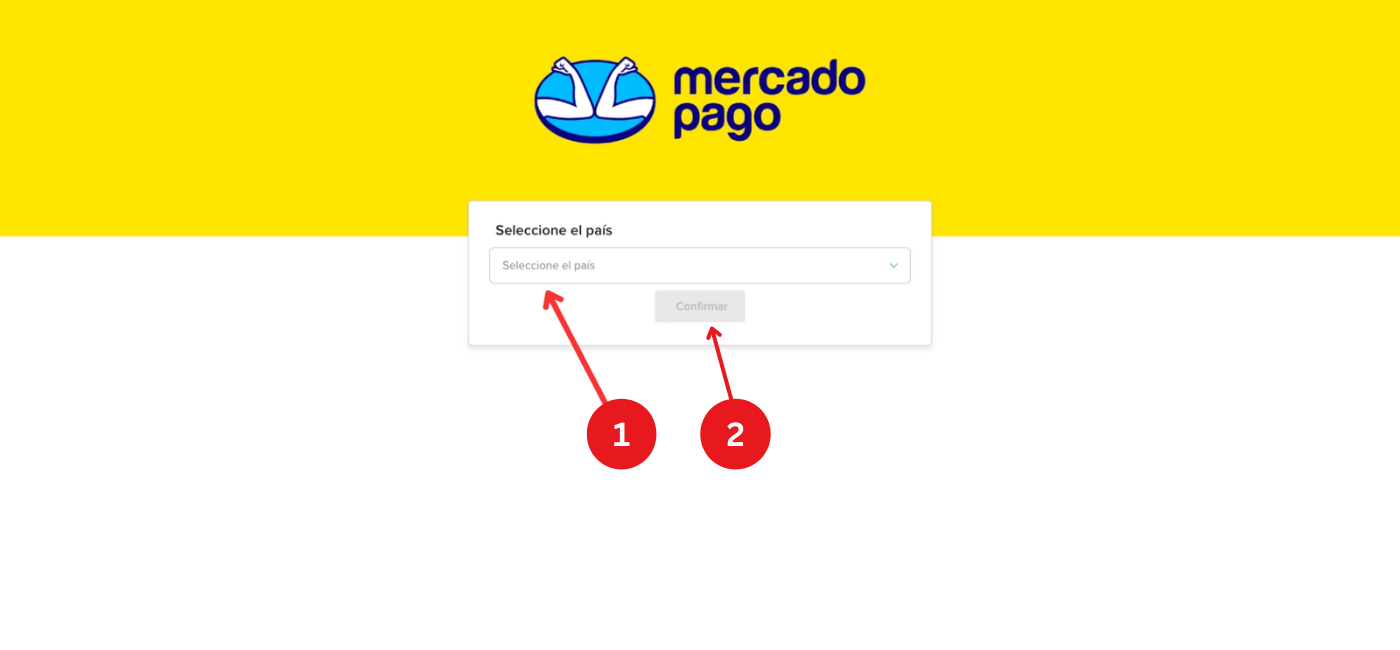
The first time you connect your account, Mercado Pago will ask you to choose a country. Select Argentina and continue with the authorization.
Then, Mercado Pago will ask you to authorize Fanz to:
- Process payments on your behalf
- Access transaction information
- Create payment links
This is completely safe and is the standard process for all platforms that use Mercado Pago.
Click "Authorize" and you'll be redirected back to Fanz.
Step 4: Confirm the connection
Once you return to Fanz, you'll see that your Mercado Pago account is connected.
The screen will show:
- Email of the connected account – To verify it's the correct one
- Connection status – Active ✓
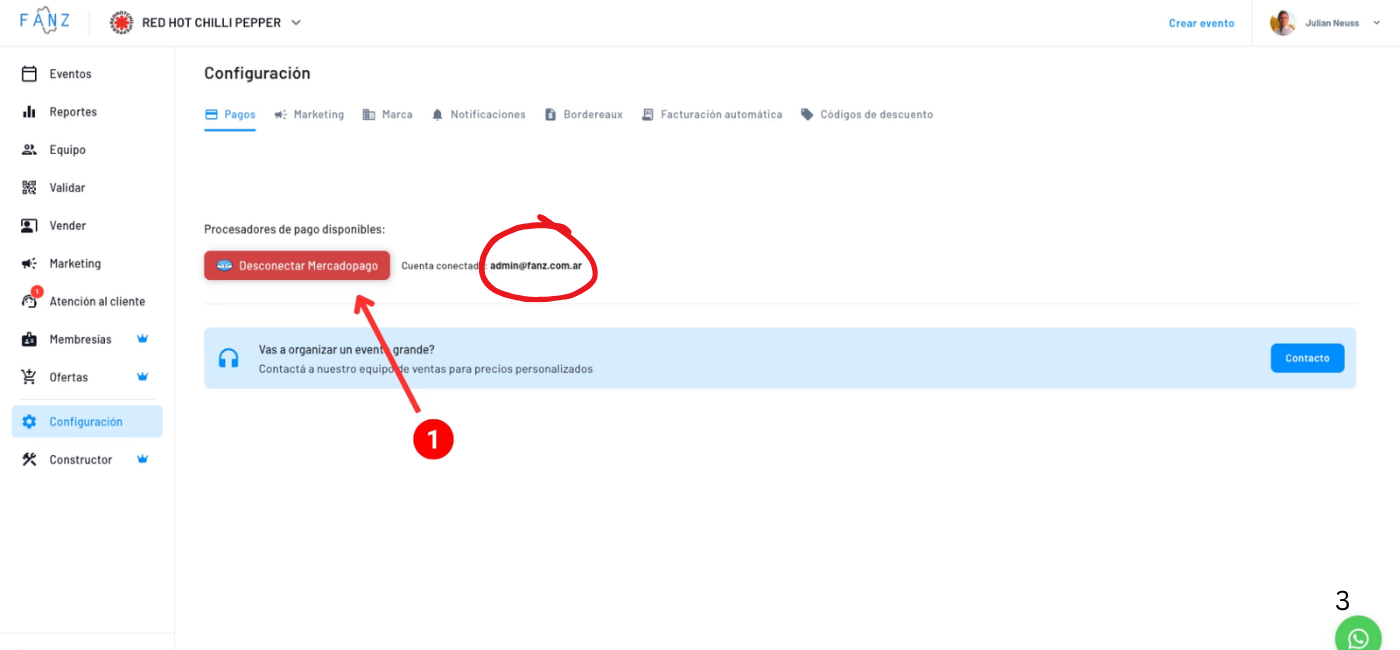
In the Mercado Pago card under Settings → Payments there is one row for event payments and, if your site has memberships enabled, a separate Subscriptions row (each is connected with its own account and shows its own email). A connected row shows a green check, the account email underneath and a Disconnect button; a disconnected row shows a grey cross and a Connect button. If the email you see is not the account where you want to get paid, disconnect and connect again with the right account.
How do I check that the money was credited? Fanz shows you the sale (in Orders and in the event metrics), but the money is credited in Mercado Pago. To confirm a payment came in, check the activity of your Mercado Pago account, where each payment appears with its release date according to the periods in the next section. If a purchase shows as approved in Fanz but you can't find it in Mercado Pago, first make sure the connected email is the account you are looking at.
Preferred rates announcement: The first time you connect a Mercado Pago account, a modal appears informing you that Fanz has already requested preferred commission rates on your behalf. The modal shows a breakdown of the reduced rates by payment method — this is an exclusive benefit of being a Fanz partner. You don't need to take any action; the request is made automatically.
Have an unfinished event? If you started creating an event before connecting Mercado Pago, a dialog will appear after the connection is complete prompting you to return and finish it. This way you can go straight from payment setup to publishing your first event without losing your place.
How much does Mercado Pago charge?
Mercado Pago charges a commission on the total of each transaction (the ticket price plus the service charge the buyer pays). Thanks to our partnership as official Mercado Pago partners, Fanz customers get access to preferential rates with fixed release periods by payment method:
| Payment method | Release | Commission |
|---|---|---|
| Account balance | 2 calendar days | 1.9% |
| Debit | 2 calendar days | 1.9% |
| Credit and all other payment methods | 10 calendar days | 3.3% |
All percentages are + VAT.
Release periods are calendar days, not business days. The countdown starts from each individual transaction (not from the event date) and includes weekends and holidays. You can see the official release schedule in your Mercado Pago account under Your money → Money to advance → View calendar.
How to activate these rates? These special commissions are available exclusively for Fanz customers. When you connect a new Mercado Pago account in Fanz, we automatically request this configuration. You do not need to choose a plan or email us to request it. Activation takes about 24 business hours from the moment you connect the account (the first-connect modal also notes it can take up to 48 hours to show in Mercado Pago). Until Mercado Pago applies them, sales use Mercado Pago's standard commissions (the preferential rates are not retroactive to those sales).
Important: Preferential rates are configured per Mercado Pago account. If you change accounts, Fanz automatically requests the configuration again for the newly connected account.
How much does Fanz charge?
Fanz's commission is 8.26% + VAT on each online sale (Mercado Pago, Stripe, etc.).
It is charged at the moment of each transaction and IS deducted from every purchase. It is automatically deducted from each sale through a payment split, so the money Mercado Pago credits to you already has the Fanz commission deducted. It is not a separate charge added at the end of the month.
At the end of the month, Fanz sends you an invoice detailing all the commissions that were already deducted during the month. That invoice is the tax receipt for the period's total — it is not a second charge and nothing is deducted again.
The Fanz commission is calculated on the total of the purchase: the ticket price plus the service charge you bill the buyer. It's the same total Mercado Pago charges its commission on.
Box-office, manual sales, reservations, and complimentary tickets pay no Fanz commission.
On refunds the commission is reimbursed. The fact that the commission is deducted on each sale doesn't mean Fanz keeps it if you refund. When you process a refund, the Fanz commission, the processor commission, and the taxes are reversed in proportion to the refunded amount. See Refunds.
Taxes and withholdings (Mercado Pago)
On top of the commissions, Mercado Pago may apply taxes and withholdings depending on your tax status and the jurisdiction where you operate. This is determined and withheld by Mercado Pago, not Fanz.
- If you are a registered taxpayer (responsable inscripto): on top of the commission, you are debited the 0.6% tax on credits and debits and the Gross Income (IIBB) withholdings that apply, based on the jurisdiction where you operate and where your buyer purchased from.
- If you are a monotributista: those withholdings do not apply. Still, upload your corresponding documentation to Mercado Pago (monotributo category, tax data) so they validate it and apply the correct treatment.
- If you have an exemption from the credits-and-debits tax or from IIBB: upload the certificate to your Mercado Pago account (in your business profile) so it's applied to your collections.
If you have trouble uploading your documentation or exemptions to Mercado Pago, email us at soporte@fanz.com.ar and we'll help you.
Two-card split payments
Fanz supports purchases paid via Mercado Pago using a two-card split (cuotas divididas entre dos tarjetas). This is a Mercado Pago feature that lets buyers divide the total amount across two different cards.
When a buyer uses this option:
- Each card charge is tracked separately within Fanz.
- Both legs are combined to determine the final status of the purchase — the order is only confirmed once both payments are approved.
- If one leg is rejected, the purchase will not be confirmed. The buyer will need to retry using a different card combination or payment method.
You don't need to configure anything to support split payments — Fanz handles them automatically.
Next steps
Now that you have Mercado Pago connected, you can:
- Create your first event → View tutorial
- Set up your white label → View tutorial
Frequently asked questions
Yes, you can disconnect and connect another account at any time from Settings → Payments. The new account is assigned to all your events and starts receiving new sales. The previous account is not deleted: Fanz keeps it linked to the purchases that were charged through it, so you can keep refunding those past sales from the dashboard without reconnecting it. If you later reconnect the same account as before, Fanz recognizes it by its email and reactivates it instead of creating a duplicate connection.
Yes. The dashboard only lets you create and publish events once the brand has a payment processor connected, even when tickets are free. Nothing is charged for free tickets; the connection is a requirement to publish.
In Fanz you see the sale and its status (approved, rejected, refunded); the money being credited is shown in your Mercado Pago account activity, with each payment's release date. If a sale shows as approved in Fanz but you can't find it in Mercado Pago, confirm you are looking at the account whose email appears under Settings → Payments.
No, the money goes directly from your buyer to your Mercado Pago account. Fanz only receives its commission through an automatic split.
Yes, Fanz also supports Stripe for international sales. Contact your account executive to activate Stripe.
If Mercado Pago suspends or limits your account, sales cannot be processed. You must resolve the issue with Mercado Pago directly.
Yes, if you have multiple brands on Fanz, each brand can have its own Mercado Pago account connected.
No, special commissions take effect from the moment Mercado Pago configures them on your account. Previous sales keep Mercado Pago's standard commissions.
Yes, Mercado Pago offers the option to advance money if it's retained due to the release period. This has an additional cost that you can check in your Mercado Pago account.
If you have a high number of rejected payments, your Mercado Pago account likely has a warning because you're missing legal documentation (tax registration, business data, etc.). Generally, Mercado Pago rejects payments when it has doubts about who is paying or who is charging. In the Fanz dashboard you can see the rejection reason in each purchase detail to identify if it was due to security, insufficient funds, or another reason.
If you've already uploaded all your business information to Mercado Pago, it's been verified correctly, and when reviewing the rejection reasons in Fanz you see they're all for "high risk", you can contact us at admin@fanz.com.ar with your brand details. We'll review it directly with the Mercado Pago team to resolve the situation.